


Timeshifter® Jet Lag
4.4706.00 Reviews
App Specs
- Version
- 2.6.1
- Updated On
- License
- Free
- Downloads
- 100,000+
- Developer
- Timeshifter Inc.
- Categories
- Travel & Local
- Platform
- Android
Screenshots
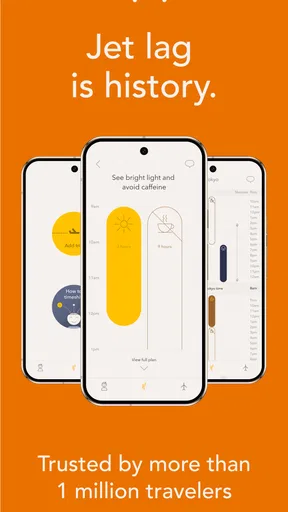

 Analysis by AppCompare
When I’m planning a trip across time zones, the hard part is not just deciding when to sleep on the plane. It’s working out how to handle light, coffee, naps, and the first day at my destination without turning every choice into guesswork. That is the problem Timeshifter Jet Lag is built around. It is a free travel app from Timeshifter Inc., and its approach feels more like a personal schedule than a general collection of travel tips.
Why trust matters when a travel plan gets personal
A jet-lag plan can involve details about where I’m going and how I usually sleep, so I want to know what I’m comfortable sharing before I follow one. The app asks for travel information and a typical sleep pattern to shape its recommendations. Those questions have a clear practical purpose: advice meant for one itinerary and one person is more useful than a broad reminder to “sleep earlier.” Still, I’d take a moment to review the choices presented during setup rather than treating any travel app as something that needs every possible detail.
I also separate trust in the plan from trust in my own ability to follow it. A recommendation can be sensible and still be a poor fit for a flight, a family schedule, or a work obligation. I use the guidance as a framework, not as a command. That distinction matters especially when the advice concerns light exposure, caffeine, or naps, because real travel days are rarely controlled experiments.
What the setup can and cannot do for a trip
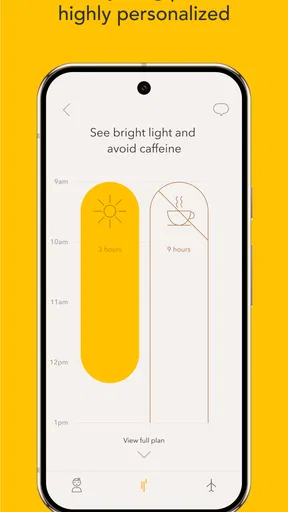
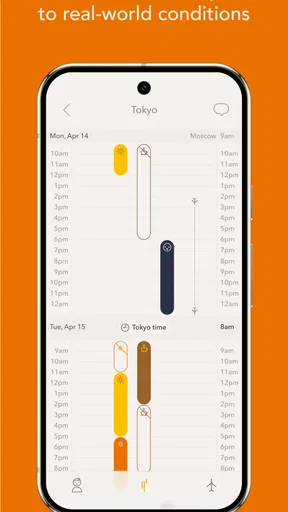
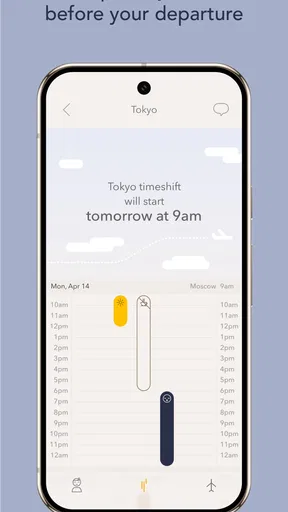
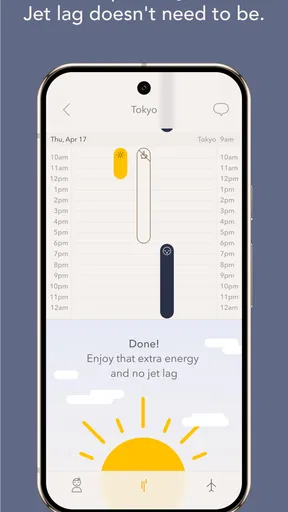
Getting started is straightforward: I enter the journey details and describe my usual sleep habits, including whether I tend toward being a night owl or an early bird. The useful payoff is a plan that connects actions to timing instead of offering disconnected wellness tips. The app can suggest when to seek or avoid light, when caffeine may fit, and when a nap makes sense, with reminders to help me keep the sequence in view.
That does not remove the need to use judgment. If I have an early connection, a meeting, or a seatmate who needs the window shade closed, I may not be able to follow a light recommendation exactly. I would rather adapt the plan to what is realistic than feel that I have failed because one instruction was inconvenient. Its value is in making the trade-offs visible before I’m tired and improvising.
Using the plan in the middle of an actual journey
Imagine I’m taking an overnight flight for a short work trip. Before departure, I can check the schedule and see whether it asks me to shift my routine gradually. At the airport, I can think twice about an extra coffee if the timing is not helpful. On the plane, I can use the guidance as a cue for rest rather than assume that every available hour should be spent trying to sleep. After landing, I can look for an opportunity to get the kind of light the plan recommends while still fitting in transport, check-in, and the first obligation of the day.
This is where I find a personalized timetable more useful than a typical jet-lag article. General advice might tell me to get daylight or avoid a late nap, but it cannot easily account for my destination and sleep pattern at the same time. The app turns those ideas into a sequence I can consult. I still need to make the day work, but I’m less likely to make every decision based only on how tired I feel in the moment.
Worth Reading Before You Choose

Flipboard Shows What News Apps Must Do Beyond the Feed

Switching to Android Auto Means Rethinking Your Driving Routine

Google Calendar Makes a Crowded Week Easier to Manage

Ludo King Makes the Most of the Minutes Between Plans

Baby Panda World Brings Quick Play to Modern Phones, but Its Game Library Feels Busy

ESPN’s Live Game View Makes Following Close Games Easier
How I’d use reminders without letting them run the trip
Notifications are handy when travel disrupts my normal sense of time, but they can also become noise if I receive more prompts than I can act on. I’d treat them as timely nudges, not obligations, and pay attention to the ones connected to the next practical decision. If I’m in a meeting or going through airport security, I can’t always respond immediately; the useful habit is to check the plan around schedule changes rather than trying to obey every reminder to the minute.
A small but useful workflow is to review the next few actions before a flight day becomes hectic. That gives me a chance to spot conflicts, such as a suggested nap that overlaps with a transfer, or a light cue that falls during a stretch when I’ll be indoors. I can then decide what is feasible in advance. This is more realistic than opening the app only after landing, when fatigue and unfamiliar surroundings make even simple choices feel harder.
Where this approach beats ordinary travel advice
Compared with a sleep-tracking app, this tool is aimed at planning around a time-zone change rather than collecting a long-term picture of nightly rest. Compared with a web article or a generic checklist, it can tailor its schedule to a particular trip and personal sleep habits. That focus is its main advantage for someone crossing several time zones who wants specific guidance instead of another set of broad rules.
The trade-off is that personalization depends on following the plan closely enough to make it useful. A person who prefers to sleep whenever possible, has an unpredictable itinerary, or wants only a quick explanation of jet lag may find a simple article easier. Someone with frequent schedule changes may also need to revisit the guidance as plans shift. I see this as a planning aid, not a substitute for flexibility or professional medical advice about sleep concerns.
Practical limits, cost, and fit
The app is free to download, with in-app purchases ranging from $4.99 to $24.99 per item. I’d check what is available in the app before building a routine around a feature, and decide whether its trip-specific guidance is useful enough for my own travel habits. With an average rating of 4.5 from around 1.7 thousand ratings, it has attracted a substantial audience, though a rating cannot tell me whether a particular plan will suit my body or itinerary.
It is rated for Everyone, and the current version is 2.2.7, with Android support beginning at version 7.0. Those details make it easier to judge basic compatibility, but they do not change the central question: will I use a schedule while traveling? If I rarely cross time zones, or I already have a routine that works and do not want reminders, I may not need a dedicated app. For repeated long-haul trips, having a plan ready before departure is a more compelling reason to try it.
First impressions and the information I enter
Have you ever landed in a new time zone, feeling like you’ve just stepped off a spaceship, completely disoriented and unsure of what day it is? Well, I recently found myself in that exact scenario, and that’s when I decided to give Timeshifter Jet Lag a try. It’s an app designed to help you kick jet lag to the curb, and let me tell you, it’s got some pretty cool features that might just make your next trip a whole lot smoother.
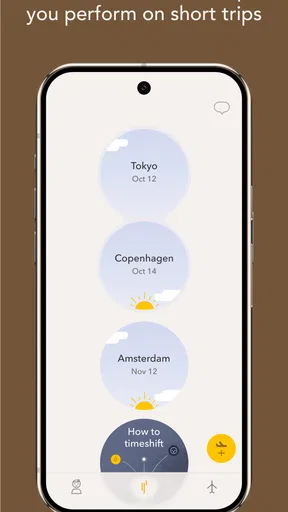
Setting up Timeshifter Jet Lag was a breeze. The app is available for both Android and iOS, so no matter what device you're rocking, you’re covered. I was immediately impressed by its clean, intuitive interface. You know how some apps feel like they’ve been designed by rocket scientists with no regard for us mere mortals? Yeah, this isn’t one of them. Everything is straightforward and easy to navigate.
The app kicks off by asking for your travel details—departure and arrival times, destination, and your typical sleep pattern. It even asks if you’re a night owl or an early bird. It’s like having your personal travel assistant in your pocket, minus the hefty price tag.
The science behind the recommendations
Now, I’m not a scientist, but I appreciate when an app backs its features with real science. Timeshifter Jet Lag uses research from sleep and circadian neuroscience to craft personalized plans. Essentially, it tells you when to seek or avoid light, when to consume caffeine, and even when to take a nap. It’s like having a little guide that whispers, “Hey, maybe skip that espresso shot right now.”
The app’s recommendations are all about shifting your body’s internal clock in alignment with your new time zone. It’s tailored to you, which I found super helpful, especially since my usual approach to jet lag is just to wing it and hope for the best.
Advice that starts before takeoff
One feature I found super helpful was the pre-travel advice. Timeshifter Jet Lag starts preparing you a few days before your trip, so you’re not just diving into the deep end once you land. The app provides a step-by-step guide, complete with notifications that keep you on track. I mean, who doesn’t love a good reminder to get some sunshine or take a power nap?
What’s more, it offers advice on managing caffeine intake, which was surprisingly insightful. I’m a coffee lover through and through, but knowing when to sip or skip made a noticeable difference in how quickly I adjusted to the new time zone.
A personal result, not a guarantee
Okay, so does it actually work? In my experience, absolutely. On my last trip to Europe, Timeshifter Jet Lag was my trusty sidekick. I followed the app’s guidelines pretty religiously, and I noticed that my usual grogginess was significantly reduced. I felt more alert, and my energy levels were much more stable throughout the day.
Of course, everyone’s body is different, and results may vary. But for me, the combination of light exposure, strategic naps, and caffeine timing made a noticeable impact. It was like having a secret weapon in my travel arsenal.
Who I’d recommend it to—and who may pass
I’d recommend it most to travelers who cross time zones often enough to benefit from preparing in advance, or to anyone facing an important first day after a long flight. A traveler who has a presentation shortly after landing, for example, may appreciate having concrete prompts about rest and light rather than relying on airport coffee and guesswork. It can also help someone who tends to drift into a long daytime nap and then struggle to sleep at the local bedtime by making the timing part of a broader plan.
I would be more cautious if a trip is already packed with fixed commitments or if following a schedule would add stress. Parents managing children’s sleep, travelers with changing flight times, and people whose work requires them to be alert at unusual hours may need to adapt the recommendations substantially. And if sleep problems are persistent or medically complicated, an app’s travel plan is not a replacement for individualized clinical guidance.
Making the plan work when reality changes
One practical tip is to build the plan around the parts of the trip I can control. I can’t guarantee sleep on a crowded flight, but I can often make a more deliberate choice about caffeine and look for a suitable chance to get outside after arrival. If a connection delays me or a meeting shifts, I can use the schedule as a reference point and reconsider the next step rather than trying to force an outdated plan onto a new day.
Another trade-off is the difference between a recommendation and a comfortable experience. Seeking light may be useful at the suggested time, yet I still need sunscreen, hydration, and common sense about weather and personal comfort. Similarly, advice about caffeine is easier to apply if I know how sensitive I am to it. I would not treat a prompt as permission to ignore my own limits; the best use is to combine the guidance with what I already know about my body.
Timeshifter Inc. has made an app in the Travel & Local category that gives jet-lag planning a focused purpose. It has more than 100 thousand installs, and its release date was May 28, 2018. Those details offer context about its reach and history, but I would still judge it by whether the tailored schedule fits my next journey and whether I find its guidance easy to act on.
A cautious verdict for the next trip
So, is Timeshifter Jet Lag worth downloading? If you’re someone who travels frequently or just hates the groggy fog that comes with crossing multiple time zones, I’d say give it a shot. The app’s thoughtful design and science-backed strategies make it a valuable tool for anyone looking to make the most out of their travel adventures.
Whether you’re flying for business or pleasure, why not arrive feeling fresh and ready to explore? Timeshifter Jet Lag might just be the travel buddy you never knew you needed. So next time you’re booking a flight, pack your bags—and your phone—with this nifty app, and say goodbye to jet lag woes.
Pros
- Customizes plans based on travel itinerary.
- Science-backed methods for jet lag relief.
- User-friendly interface with clear guidance.
- Works offline
- perfect for in-flight use.
- Syncs with calendar for seamless planning.
Cons
- Subscription required for full features.
- Initial setup can be time-consuming.
- Limited support for irregular schedules.
- Some features need frequent internet access.
- May not suit casual or infrequent travelers.
FAQs for Timeshifter® Jet Lag
What is Timeshifter Jet Lag and how does it work?
Timeshifter Jet Lag is an app designed to help travelers minimize the effects of jet lag using personalized advice based on your travel itinerary, sleep pattern, and individual preferences. It provides a detailed plan that includes recommendations on when to seek or avoid light, when to sleep, and when to consume caffeine, helping you adjust to new time zones more smoothly.
Is Timeshifter Jet Lag suitable for all types of travelers?
Yes, Timeshifter Jet Lag is designed for a wide range of travelers, including frequent flyers, business travelers, and vacationers. The app customizes its recommendations based on your specific travel schedule and personal habits, making it a versatile tool for anyone looking to reduce the impact of jet lag, regardless of their travel experience.
How user-friendly is the Timeshifter interface?
The Timeshifter app features a user-friendly interface that is intuitive and easy to navigate. Upon entering your travel details, the app generates a personalized jet lag plan that is simple to follow. The step-by-step instructions and clear visual cues make it accessible even for users who are not tech-savvy.
Does Timeshifter Jet Lag support multiple time zones?
Absolutely. Timeshifter is specifically designed to handle multiple time zones effectively. It analyzes your travel itinerary and provides guidance for each leg of your journey, ensuring you can seamlessly adjust to different time zones. This feature is particularly beneficial for those with complex travel plans or layovers.
Is there any cost associated with using Timeshifter Jet Lag?
Timeshifter offers both free and premium versions. The free version provides basic guidance, while the premium version offers detailed, personalized plans for unlimited trips. The premium subscription comes with a trial period, allowing users to explore the full features before committing to a purchase, making it a flexible option for all budgets.


